

Mixing a live set isn’t just pushing buttons—it’s about making sometimes wild, unpredictable musical moments instantly manageable, even when a 10-piece band or chaotic club scene tries to steal your focus. Subgroups are a pro’s shortcut to keeping it all tight.
As the audio mixing guide from Yamaha Music explains, a subgroup works by routing the output of several related tracks—such as all the microphones on a drum kit, or a set of background vocals—onto a single stereo bus channel.
This strategy provides two main advantages: Streamlined Control (allowing the engineer to adjust the overall volume of the entire drum kit with just one fader, without affecting the balance between the kick and snare) and Group Processing (enabling the engineer to apply a single effect, like a compressor or EQ, to glue the whole group together, rather than inserting the same plugin on every individual channel, which conserves valuable resources)
What Are Subgroups—and Why Should You Care?
A subgroup is a simple idea: instead of treating every instrument or mic as its own island, you link related channels (like all drums, or all backing vocals) together. Then, instead of riding five or six faders, you’ve got one that controls the whole section. Want to push the guitars for a solo, or duck the drums during the outro? It’s a single move.
The Real-World Benefits
- Speed: One fader, big impact. Instantly adjust a section—no more hunting for individual channels.
- Control: Ride whole groups without wrecking your careful song-to-song balance. Great for moments when everything shifts (like a quiet verse turning explosive).
- Cleaner Sound: Apply EQ or compression to an entire subgroup. Keep those backing vocals glued together or tighten up the whole rhythm section with a shared effect.
- Lower Stress: In festival chaos, you’ll thank yourself for less scrambling and more actual listening.
How to Set Up Subgroups (Step-by-Step)
- Decide What Needs a Group: Classic plays: drums, backing vocals, all guitars, horns, or percussion. Any cluster with several mics or instruments is a prime target.
- Route Channels to Subgroups: On most mixers, assign each target channel to its respective subgroup bus (often labeled “Group 1/2/3/4”). Double-check that stereo sources hit two subgroup channels if you want to keep them panned in the mix.
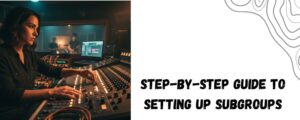
- Use Subgroup Faders: Mix your song as usual, but when the drums need to come up, or all the backing singers need a tweak, reach for the subgroup. For fast-paced shows, label these with big tape—‘DRUMS’, ‘BVS’, etc.
- Shape with Bus Processing: Want to compress all vocals with one move, or add reverb to every snare and tom? Patch these effects into the subgroup itself, not 10 individual channels.
Tricks from Seasoned Mixers
- Practice muting or soloing subgroups to kill feedback or preview sections in a hurry.
- For sudden genre or energy changes (think funk jam after an acoustic set), subgroups are a lifesaver: one push, new feel.
- Always reset your groups at soundcheck. Forgetting to unassign a channel can leave you chasing a “missing mic” mid-set.
The Right Gear
5 Core Professional 12-Channel Audio Mixer
The 5 Core MX-12CH is a versatile 12-channel analog mixer tailored for recording studios, live DJ sets, podcasting, karaoke, and stage performances. It includes 11 mono inputs and 2 stereo channels, a comprehensive 3-band EQ per channel, and offers lush DSP effects including delay and reverb for creative mixing. The mixer features 48V phantom power to support condenser microphones, Bluetooth 5.0 input for wireless streaming, and a USB interface for PC/Mac recording compatibility with popular DAWs.
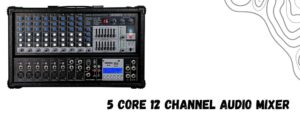
- 12 channels: 11 mono + 2 stereo
- 3-band EQ on each channel (high, mid, low)
- DSP effects: delay & reverb for sound enhancement
- Bluetooth 5.0 for wireless audio streaming
- 48V phantom power for condenser mic support
- USB interface for PC/Mac recording (cable not included)
- PFL/AFL with digital level display for monitoring
- Frequency response: 20Hz to 20kHz ±3dB
- Voltage: 100–240V universal power supply
- Includes power cord; solid build for portability and ruggedness
Harbinger LX12 12-Channel Analog Mixer – Bluetooth, Effects, USB Audio
The Harbinger LX12 is a professional analog mixer designed for musicians, DJs, podcasters, and live sound applications. It offers 12 total channels with 8 mono XLR/line inputs and 2 stereo channels. Features include 3-band EQ per mono channel, onboard digital effects such as reverb and delay, and Bluetooth 5.0 wireless connectivity for seamless music streaming. The LX12 also integrates a USB audio interface for multitrack recording on PC or Mac, compatible with major DAWs. Its rugged metal chassis, convenient controls, and flexible input/output options make it perfect for studio, stage, and mobile productions.
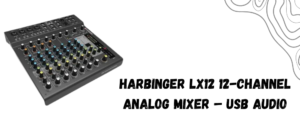
- 12 channels: 8 mono XLR/1/4″ + 2 stereo channels
- 3-band EQ per mono channel for detailed tone shaping
- Onboard digital effects: reverb, delay
- Bluetooth 5.0 audio streaming compatibility
- USB 2.0 interface for recording/playback
- Phantom power for condenser microphones
- Multiple outputs for mixer integration and monitoring
- Metal chassis for durability in professional environments
Bottom Line
The best live engineers don’t look busy—they look calm. Subgroups are a big reason why. They’re the “under the hood” glue holding every great mix together, letting you stay present with the music and one step ahead of the chaos. Set them up right, and discover how smooth mixing can really be.
Here you can also find amazing drum thrones; alternatively, browse our page to find the best keyboard bench, audio mixers, drum mics, piano bench, keyboard stand, speakers, party speakers, and more.