

Home studios have exploded—not because pros are hiding from big studios, but because everyone from producers to podcasters wants control, speed, and a personal sound. The glue for all this? A good mixer. It might look busy, but having faders, EQ, USB, and true routing in one box means you don’t have to tap-dance between laptops, cables, and last-minute workarounds. With the right mixer, you get more recording, less fiddling—period.
As detailed by the production experts at Produce Like A Pro, incorporating a physical mixer streamlines the creative process by allowing the user to bypass continuous software navigation and latency issues. Modern analog or hybrid mixers consolidate multiple functions—serving as a monitoring controller, an input preamp, and an analog summing device—which is crucial for musicians who prefer to leave multiple instruments and microphones permanently patched in.
This setup ensures the studio is always instantly ready for recording, providing the engineer with immediate, hands-on control over input levels and effects sends without being dependent on a digital audio workstation
Step 1: Choose the Mixer That Fits Your World
- I/O for Now (and a Bit Later): Count the mics, instruments, and gadgets you plan to use. It pays to leave a channel or two open for surprises—but don’t pay for a stadium-sized board if all you need is four solid lines.
- Core Features: Look for clean preamps, USB or multi-format computer interface, phantom power for condensers, and dedicated monitor/headphone outs.
Step 2: Layout Without Sacrificing Space
- Place the mixer close to both your main seat and your computer. You want to grab a knob or mute button without twisting like a contortionist.
- Use a small rolling cart or shelf (wheels = heaven) for your mixer, interface, and cable storage. You’ll thank yourself on late editing nights or when you need to move your setup for guests.
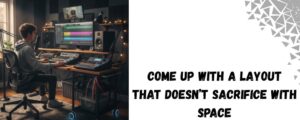
- Mount mics on arms attached to desks or wall stands; clamp headphones, velcro cable ties, and stash adapters in a simple bin nearby.
Step 3: Patch and Power Up—Cable Tidy, Clarity Happy
- Use color-coded cables for each input type. One tangling mess can kill a session’s momentum.
- Try to keep instrument and mic cables on the left, headphones and outputs on the right. Bundling with fabric ties prevents the classic “what’s this wire for?” game.
- Keep a small, labeled power strip under the desk dedicated to studio gear—avoid family or kitchen appliances “borrowing a plug” in crunch time.
Step 4: Routing for Dreams and Guests Alike
- Practice a quick “input sweep”—test each channel, then label the strip with tape or chalk so you never guess.
- Set up loopback or auxiliary mix for remote guests on streams. Products like the RockMix and 5 Core have USB routing or loopback for easy Skype/Zoom/DAW setups with no extra gadgets.
- If you’re streaming, route your main mix to headphones AND speakers. Set up for hands-on muting if you have to wrangle noisy housemates or unexpected barking.
Product Spotlight
5 Core 4-Channel Audio Mixer
The 5 Core 4-Channel Audio Mixer is a compact, versatile mixer built for musicians, DJs, podcasters, and karaoke enthusiasts. It features 4 independent channels including XLR and 1/4″ inputs for microphones and instruments, with 48V phantom power to support condenser mics for professional studio-quality sound. The built-in USB interface enables seamless PC and Mac recording, while Bluetooth connectivity facilitates wireless music streaming from any device.
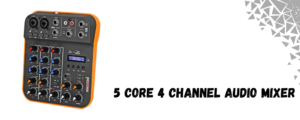
- 4 input channels: 2 XLR mic/line + 2 stereo line inputs
- Built-in USB audio interface for direct PC/Mac connection
- Bluetooth 5.0 for wireless audio streaming
- 48V phantom power for condenser microphone support
- Individual channel gain and 2-band EQ controls
- Compact, lightweight design for easy transport
- Ideal applications: Live streaming, podcasts, DJ performances, karaoke
Rockville RockMix 4 INT 4-Channel Mixer with USB Audio Interface and Phantom Power
The Rockville RockMix 4 INT is an all-in-one compact mixer designed for professional audio applications such as home studios, live performances, podcasting, and DJ sets. It offers two combo XLR/1/4″ mono inputs and two stereo line inputs, with +48V phantom power on the mic channels for crystal-clear condenser mic usage. The integrated USB interface allows easy digital recording and playback on PC or Mac.
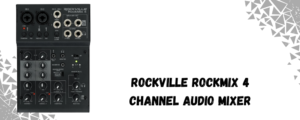
- 4 channels: 2 mono XLR/1/4″ + 2 stereo line inputs
- USB audio interface for seamless recording and streaming
- +48V phantom power for condenser microphones
- Individual gain and 2-band EQ on each channel
- Headphone out for real-time monitoring
- Compact and durable design for studio and gig use
Home Studio Hacks From People Who’ve Gone There
- Make It Mobile: Even if you love your setup, life changes. A modular, small-footprint cart means you can roll away “work” at the end of a tough night—or hide chaos before company arrives.
- Lighting is Everything: A $10 gooseneck LED lamp aimed at your mixer will save your eyes, your mix, and your relationships with neighbors.
- Never Underestimate Good Headphones: You’ll hear mistakes, weird hums, and off-balance mixes faster than through any cheap monitor. Invest once—save hours.
Bottom Line:
A thoughtful, mixer-centered home studio isn’t about maxing out on gear—it’s about creating a flow. Everything should be an arm’s reach from that mixing desk, with enough flexibility to let ideas land fast and without clutter or confusion. Build it so you want to use it, every single day.
Here you can also find amazing drum thrones; alternatively, browse our page to find the best keyboard bench, audio mixers, drum mics, piano bench, keyboard stand, speakers, party speakers, and more.